Importance of WiFi Cards for Desktops: Buy WiFi Cards For Desktops
In today’s digital age, having a reliable internet connection is essential for desktops, whether for gaming, streaming, or productivity. WiFi cards play a crucial role in enhancing desktop performance by providing a seamless wireless connection. By upgrading from wired connections to WiFi cards, users can experience greater flexibility and mobility without being tethered to a cable.
WiFi cards not only improve connection stability but also allow for faster data transfer rates and access to higher bandwidth, which is critical for activities like online gaming and HD video streaming. When considering a WiFi card, important features include compatibility with existing hardware, data transfer speeds, and the ability to support the latest WiFi standards.
Types of WiFi Cards Available
There are several types of WiFi cards available, each offering unique benefits based on user needs. Understanding these types can help users make informed decisions about which card to purchase.
- PCIe Cards: Internal cards that provide high performance and stability, ideal for gaming and heavy data usage.
- USB Adapters: External devices that offer convenience and portability, perfect for users needing quick installation or those with laptops.
- Mini PCIe/PCI Cards: Smaller versions suitable for compact devices, often found in laptops or small form factor desktops.
When comparing internal and external WiFi cards, PCIe cards generally offer superior performance due to their direct connection to the motherboard, while USB adapters provide ease of use and flexibility. However, USB adapters can sometimes fall short on speed compared to PCIe options.
Factors to Consider When Buying WiFi Cards
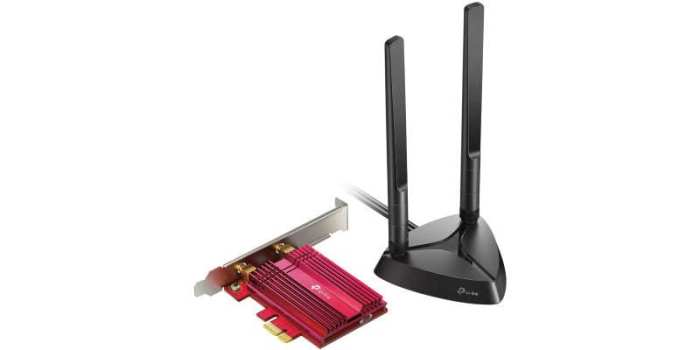
Choosing the right WiFi card involves considering several factors that ensure compatibility and performance. Users must check compatibility with their motherboard and operating systems, as not all cards work seamlessly with every setup.
The significance of WiFi standards cannot be overstated. Current standards like 802.11ac and the newer 802.11ax (WiFi 6) offer substantial improvements in speed and efficiency. Users should prioritize specifications such as:
- Data transfer rates (measured in Mbps).
- Frequency bands supported (2.4GHz vs. 5GHz).
- Number of antennas (MIMO technology for better performance).
- Compatibility with current and future WiFi standards.
Top WiFi Cards for Desktops
Here is a list of recommended WiFi cards that deliver excellent performance and features for desktop users:
| Model | Specifications | Key Features |
|---|---|---|
| TP-Link Archer TX3000E | WiFi 6, 2402 Mbps (5GHz), 574 Mbps (2.4GHz) | Bluetooth 5.0, high-gain antennas, low latency |
| Asus PCE-AC88 | AC3100, 2100 Mbps (5GHz), 1000 Mbps (2.4GHz) | MIMO, heatsink, dual-band |
| Netgear Nighthawk A7000 | AC1900, 1300 Mbps (5GHz), 600 Mbps (2.4GHz) | USB 3.0, external antennas, compact design |
User reviews highlight the ease of installation and improved connectivity with these models, making them popular choices among gamers and professionals alike. Installation typically involves inserting the card into a PCIe slot for internal models or connecting a USB adapter to an available port, making it accessible for users of all skill levels.
Troubleshooting Common WiFi Card Issues, Buy WiFi Cards for Desktops
Diagnosing connectivity problems with WiFi cards can often seem daunting, but several common issues can be addressed effectively. Users should start by checking their network settings and ensuring that drivers are up to date.
Common installation errors may include improper seating of the card in its slot or failure to install necessary drivers. Resolving these issues often involves reseating the card or reinstalling the drivers from the manufacturer’s website.
To optimize WiFi card performance post-installation, users can adjust settings within their operating system or router, utilize network management tools, and consider upgrading their router to match the capabilities of their new WiFi card.
Future Trends in WiFi Technology
The future of WiFi technology holds exciting possibilities, especially with the introduction of new standards like WiFi 6E. This technology expands the capabilities of WiFi 6 by utilizing the 6GHz band, thus alleviating congestion and improving overall connectivity for users.
WiFi 6E offers advantages such as increased speeds, lower latency, and improved capacity for multiple devices connecting simultaneously, which is particularly beneficial in smart homes or office environments. As the demand for high-speed internet continues to grow, innovative designs and features in WiFi cards will likely emerge, providing users with even more reliable and efficient options.